Welcome to my Creative World !

Hello there!, Welcome to my website. Please take a tour to my website. You can get the best view and experience if you are visiting this site from your desktop/laptop. If you like my work or want any service from me, or if you have any query or suggestions feel free to contact me. And I'm also open to hire and collaboration. Please DM me if you want to hire me or want a collab. I'll get back to you.

My Services Contact Me

My Services

Music

Love Music? EDM, Progressive house, Mashup, any type of Remix, Guitar Cover ? Then you are at the right place. Please check my music portfolio by clicking on the See More button below, because Music has no language but it's still beautiful.

See More

Design

Love Design? Graphics Design, Web Design, Character Design, Digital Painting, illustration ? Then don't forget to check my design portfolio by clicking on the See More button below, because Art speaks where words stops.

See More

Photography

Love Photography ? Nature Photography, Wildlife, Pet, Stock photography? Then please check my photography portfolio by clicking the See More button below, because photography is only the Language which recognized by the Worldwide

See More

Tech Tips

Tech Savvy ? passionate about electronics gadgets, cyber security, new technologies? then this section is for yours. Please check my Tech Tips section by clicking on the See More button below, because staying updated is staying cool.

See More

Check my Recent Blogs Here

Ethical Hacking For Beginners (Chapter-9)

hardware engineering

What is computer Hardware:-

Computer hardware includes the physical parts of a computer system. Like processor, cabinet, motherboard, mouse, keyboard, monitor, hard disk drive, solid state drive, ram, smps, optical disk drive, heatsink, graphics card, cpu cooler, sound card, speaker etc.
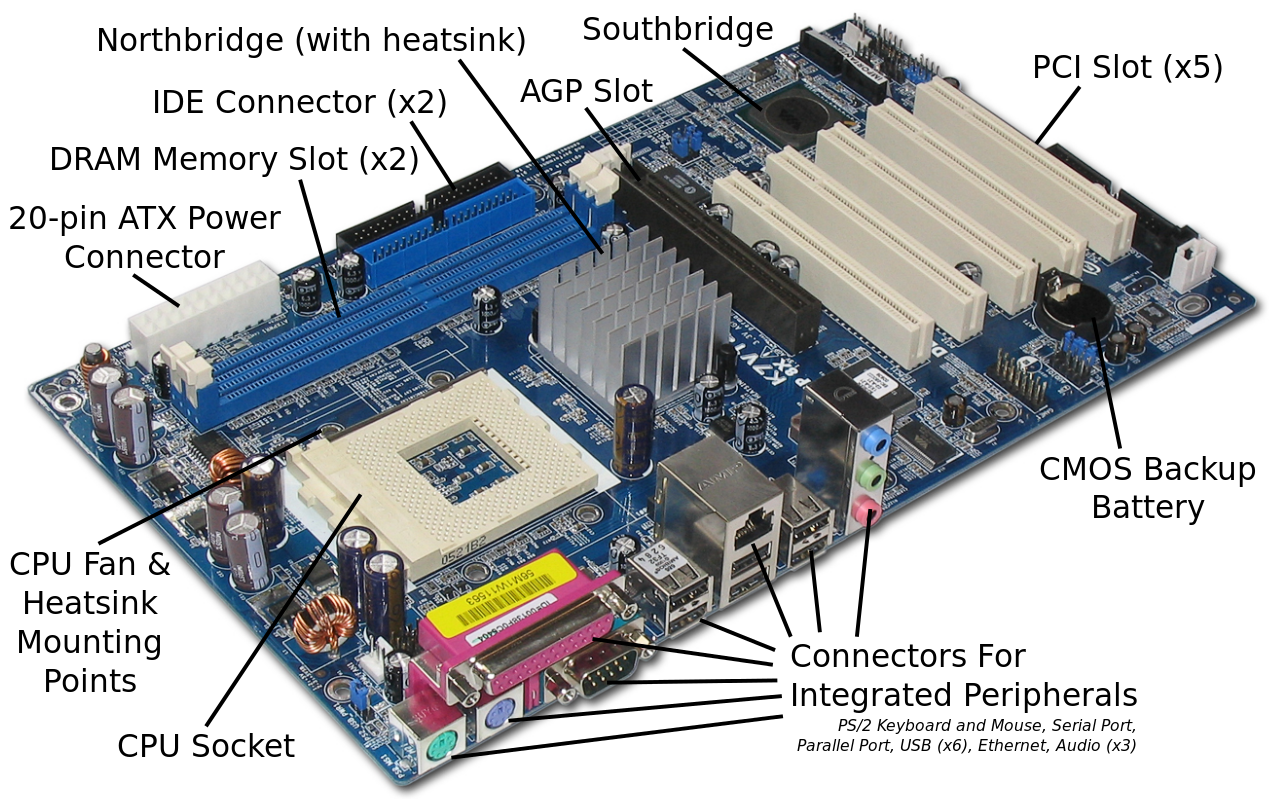
Source:- Wikimedia


List of computer hardware and their work:- 

  • SMPS:- Switched Mode Power Supply. It converts AC to DC as per hardware components requirement.

  • Motherboard:- The main component of a computer system which holds all the elements. Ram, processor, connects hdd, odd, ssd, monitor etc.

  • Processor:- The brain of a computer which processes all the program operation in a computer system.

Types of cpu socket:-

LPA (LAND GRID ARRAY)

PGA (PIN GRID ARRAY)

  • Storage Device:- HDD, SSD, ODD are called storage devices. This devices are connected through SATA(Serial ATA 7 pin), PATA/ATA(Parallel ATA 40 pin), SCSI (Small Computer System Interface 60-80 pins), Nvme/ M.2 for ssd

  • RAM:- The Volatile Memory which is accessed randomly while the system is in operation. 

Types of Ram architecture

SIMM (Single in Line Memory Module)

32 bit data path


DIMM (dual in-line memory module)

Transfer 64 bits of data at a time.


RDIMM (Registered DIMM)

DIMM with improve reliability.


DDR (Dual Data Rate)

Sends double the amount of data in each cbck signal. It has 184 pins.


DDR2

It is faster than DDR because it allows for higer bus speeds. Use less power compare to DDR. It has 240 pins.


DDR3

Twice fast comparison DDR2. Use less power then DDR2.It has 240 pin.


DDR4

Use less power then DDR3. It has 288 pin.Process higher speed than DDR3.Use less power.


  • ROM:-Bios and booting module is stored in ROM.(Read Only Memory) – It is a Non-volatile memory. Data in ROM is permanently return and is not erased when you power off your computer


  • Socket:- Physical connection b/w motherboard and Processor. (where processor fit) responsible for transmitting energy to the Processor.

Sockets are mainly 2 types.

LGA:- Land grid array

PGA:- Pin grid array.


  • Core:- Core is defined as the brain of a CPU. It is responsible for processing speed. The more core it has the more speed it can achieve because in that case, it can simultaneously perform more operations than a single processor or brain can.


  • PCI Slot:- Peripheral component interconnect port used for connecting peripheral devices such as graphics card sound card. PCI is the bigger slot and PCI Express has variants like PCI X1, X3, X5, X16, etc.


  • North and South Bridge:- These 2 bridges control all connected components of a motherboard. Northbridge controls RAM, CPU, AGP, and South Bridge control I/O devices, Bios, PCI Express, USB, etc. These 2 bridges are interconnected with linker to each other.

Some common problem faced when these 2 bridges fails or malfunction:- 

NorthBridge related:- No display, No RAM detected, Graphics related problem, flickering display.

SouthBridge related:- PC restart and shutdown automatically, BIOS Corruption, BSOD(Blue screen of death), unrecognized hardware, PC Freezes, Slow or lagging performance, etc.


  • CPU Ports:- 

    • PS2 PORT– USE FOR CONNECT KEYBOARD AND MOUSE

          Purple– keyboard            Green– Mouse


  • USB Port– 2.0, 3.0, 3.1, 3.2, Type C-latest

  • Lan Port Or NIC Card– to connect to ethernet cable. 2.5G, 5G, 10G Lan

  • WiFi Antenna:- For Connect Wifi Antenna (Highend Motherboard have this)

  • Audio port– MIC — Pink

  •  Headphone– Green

  • Audio out — Blue

  • Side Speaker:- White

  • Rear Speaker:- Black

  • Subwoofer/center:- Orange

  • OFC port:- Transmit optical audio out

  • VGA Port– To connect display to cpu. 9pins

  • HDMI/Display port– high display multimedia interface

         Used for to watch HD video in display.


  • DVI Port– Support digital signal

         If we use DVI port for display, we have to external audio port for audio as it only supports video.


  • Expansion slot—To add extra ports to CPU Parallel advanced Technology Attachment 40 pin Data transmission is parallel

  • BIOS And CMOS Reset Pin:- Used to restore BIOS if crashed or corrupted and reset CMOS data such as Date, time, BIOS, and hardware settings. (Only available on Highend Motherboards)


  • BIOS:- The Basic Input Output System, or BIOS, is a very small piece of code contained on a chip on your system board. When you start your computer, BIOS is the first software that runs. It identifies your computer's hardware, configures it, tests it, and connects it to the operating system for further instruction.


There are 2 types of bios:- Legacy and UEFI Bios


Legacy:- Legacy BIOS is run by option Read-Only Memory (ROM's), which collectively is limited to 64 KB of storage. The option ROMs that legacy systems run will only work if they are compatible with the hardware that is running with it.


UEFI:- In UEFI BIOS the drivers have virtually no space limitations and are compatible with upgraded forms of hardware. Drivers are written separately and can be uploaded using a flash drive. The information uploaded onto the system is then processed by UEFI’s programming interface, which configures the data to ensure compatibility.


  • CMOS Battery – CMOS(Complementary Metal-oxide Semiconductor), Battery provide a power supply of BIOS chip to maintain date and time. It have two size


  • CACHE MEMORY – Self memory of processor is called cache memory there are three types of cache memory

  • Hard Disk Partition:- There are 2 types of hdd partition available for installing windows OS.

    • MBR (Master Boot Record ) – The area of hard disk which is used to detect BIOS and start the booting process of HDD(Track 0, Sector 0, Cylinder 0)


  • GPT (GUID Partition Table)(Globally Unique Identify) – It is same of MBR. All Morden PC Operating System Support GPT including MAC OS and Windows OS.


  • File System:-  format is method to create allocation table of any storage media and the process complete with help file system. There are following File System

    • FAT (File Allocation Table) 

    • FAT-32 Max File size 4GB, Max partition size 2TB, No corruption repair, Compression not available.

    • NTFS (New Technology File System) Max file size 16TB, Max partition 8PB(Peta Byte), Auto corruption capability, Compression available

    • CDFS (CD/DVD)

  • Minimum Specs for installing Windows:- 

Component

Bit

Windows 11

Windows 10

Windows 8

Windows 7

Windows XP


Processor

32

Not available

1GHz or Higher

1GHz or Higher

1GHz or Higher

300MHz or Higher

64

1GHz or Higher

1GHz or Higher

1GHz or Higher

1GHz or Higher

300MHz or Higher


RAM

32

Not Available

1GB

1GB

1GB

128MB or higher

64

4GB or Greater

2GB

2GB

2GB

128MB or Higher


HDD

32

Not Available

16GB

16GB

16GB

1.5GB minimum

64

64GB or Greater

20GB

20GB

16GB

1.5GB Minimum

Graphics Card

N/A

DirectX12 or Higher supported

DirectX9 or Higher supported

DirectX9 or Higher supported

DirectX9 or Higher supported

Any SVGA video card


  • NAS:- Network-attached storage (NAS) is a file-level computer data storage server connected to a computer network providing data access to a heterogeneous group of clients. NAS is specialized for serving files either by its hardware, software, or configuration.

  • SAM:- Security Account Manager is a database file in Windows OS where it stores Users’ passwords. Which is used to authenticate local and remote users.It contains passwords in an encrypted format.

The location of the file is:-  C:\windows\system32\config\SAM


 In the next chapter, we will discuss the Database and its basics. Till then Happy Learning!

Ethical Hacking for Beginners (Chapter-8)

cyber security certification

IP ADDRESS OVERVIEW

Classification of IP:-

IP addresses are generally divided into 3 classes.
Class A: 0.0.0.0 - 127.255.255.255
Class B: 128.0.0.0 - 191.255.255.255
Class C: 192.0.0.0 - 223.255.255.255

Public vs Private IP address:-

A public IP address is an IP address that can be accessed directly over the internet and is assigned to your network router by your internet service provider (ISP). Your personal device also has a private IP that remains hidden when you connect to the internet through your router's public IP.
A private IP address is an address your network router assigns to your device. Each device within the same network is assigned a unique private IP address, this is how devices on the same internal network talk to each other. When you type ipconfig or ifconfig then your computer shows you the private IP of your device eg:- 192.168.xxx.xxx


Structure of an IP Packet and Classification of IP addresses:- 


An IP packet consists of mainly 6 parts:-
Header:- It contains the header and version information of an IP address.
Checksum:- This field is used to keep the checksum value of the entire header which is then used to check if the packet is received error-free.
Source address:- 32-bit address of the Sender (or source) of the packet.
Destination Address:- 32-bit address of the Receiver (or destination) of the packet.
Options:- This is an optional field, which is used if the value of IHL is greater than 5. These options may contain values for options such as Security, Record Route, Time Stamp, etc.
Data:- It contains the actual information which that data packet contains
An IP packet can max 64Kb in length.

IP address Classification:-

IP addresses are classified into 3 categories mainly Class A, B, C. Except this D and E also exist but they are used for another purpose. D used for multicast purpose and E for experimental purpose.

Class

Range

Network Mask

Prefix

No. of Network

No. of Hosts

A

1.-127.

255.0.0.0

/8

125

16,777,214

B

128.-191.

255.255.0.0

/16

16,382

65,534

C

192.-223.

255.255.255.0

/24

2,097,150

254

D

224.-239.

Multicast Address

E

240.-245.

Experimental


In the next chapter, we will discuss Computer Hardware and its functionalities.


Till Then Happy Learning.


Ethical Hacking for Beginners (Chapter-7)

cyber security certification

Networking Protocols and Models

Networking Protocols:- 

A network protocol is an established set of rules that determine how data is transmitted between different devices in the same network. Essentially, it allows connected devices to communicate with each other, regardless of any differences in their internal processes, structure, or design. 

List of network protocols:-


Transmission Control Protocol (TCP)
Internet Protocol (IP)
User Datagram Protocol (UDP)
Post office Protocol (POP)
Simple mail transport Protocol (SMTP)
File Transfer Protocol (FTP)
HyperText Transfer Protocol (HTTP)
HyperText Transfer Protocol Secure (HTTPS)
Telnet
Gopher


Some other non-popular protocols:-


ARP (Address Resolution Protocol)
DHCP (Dynamic Host Configuration Protocol)
IMAP4 (Internet Message Access Protocol)
SIP (Session Initiation Protocol)
RTP (Real-Time Transport Protocol)
RLP (Resource Location Protocol)
RAP (Route Access Protocol)
L2TP (Layer Two Tunnelling Protocol)
PPTP (Point To Point Tunnelling Protocol)
SNMP (Simple Network Management Protocol)
TFTP (Trivial File Transfer Protocol)


NAT:- Network address translation (NAT) is a method of mapping an IP address space into another by modifying network address information in the IP header of packets while they are in transit across a traffic routing device.
The  NAT device accepts requests to traverse the internet from an internal machine. It then records that machine's IP address in a table and converts the IP address to the external IP address of the router. When the packet returns from its destination, the NAT device looks into its saved table of the original request and forwards the packet to the internal IP address of the system that made the original request within the LAN. And this process is so fast that one can’t even realize this whole conversion is happening on the back end.

OSI Model:-

Networking interview questions


The OSI Model consists of 7 layers. They are:-
Application Layer (Application Connected to the internet)
Presentation Layer (Standard data representation for application)
Session Layer (Manage session among applications)
Transport Layer (End to end error detection and correction)
Network Layer (Handle connection to the network by a higher layer)
Data Link Layer (provide safe communication of data over the physical network)
Physical layer (Define the physical characteristics of the network)
*Where First 3 are Software Layer and Last 3 are Hardware layer and the Middle one Transport Layer is the heart of OSI Model
We will dive deep into all of these layers in another chapter.

TCP/IP Model:-

Ethical hacking tutorial


TCP/IP model consists of 4 layers only. 
Application Layer (In this layer App and processes running on the network.)
Transport layer (Provides end to end data delivery service)
Internet Layer (Make datagram and handles data routines)
Network Layer (Provides routines allowing access to the physical network)
Will discuss all of these layers in detail in the future.

In the next chapter, we will discuss IP Addresses in detail.


Till then Happy Learning!


Ethical Hacking for Beginners (Chapter-6)

Cyber security certification 

Networking Basics

What is Networking?

A network refers to two or more connected computers that can share resources such as data, a printer, an Internet connection, applications, or a combination of these resources.


Types of Network:- 

1. LAN (Local Area Network):- Mostly covers buildings or a set of closely related buildings

2. MAN (Metropolitan Area Network):- Covers a metropolitan area or a small geographic area such as a small town.

3. WAN (Wide Area Network):- Covers countries, or a large geographic area.


Open System:- A system that is connected to internet and ready to communicate is called open system

Closed System:- A system is not connected to the internet and can’t be communicated with.


Network topologies:- The arrangement of devices connected to a network. 

Some examples are:- Star, bus, Delta, ring, mesh, point to point, daisy chain, tree, hybrid etc.


image source:- Wikimedia commons

Network Components:- A network connection may have multiple other devices by which communication also occurs. Eg:- Router, switch, hub, bridge, wireless router, etc.

Unique identifiers of a network:-


Each device in a network is associated with some unique identifiers by using which a device can be identified.


1. Host Name:- Each device in the network is associated with a unique device name known as Hostname which you can get t know by typing “hostname” in the command prompt (without quotation) 

2. IP Address:- It is the logical address of a device connected to a network. It is a unique number assigned to every device connected to the internet. It has 2 versions IPv4 (32 bit long) and IPv6 (128 bit long). You can see it by typing “iconfig” in the command prompt for windows and “ifconfig” in Linux (without quote)

3. MAC Address:- This is the physical address. It is the unique identifier attached with each device NIC card (network interface card). It is 48 bit long. You can check it by using the same command “ipconfig/all”

4. Port:- Can be referred to as a logical channel using which data packets are transferred to any applications. It is a 16-bit long integer number and we have 216  ports available. Start from 0-65535 total 65536 ports. You can check by typing “netstat -a” by typing in the command prompt which ports are currently being used.


List of some important ports:-

20 FTP

21 FTP

22 SSH

23 Telnet

25 SMTP

53 DNS

69 TFTP

80 HTTP

88 Kerberos

110 POP3

123 NTP

135 Microsoft's RPC

137-139 Microsoft's NetBIOS

143 IMAP

161 SNMP

389 LDAP

443 HTTPS or HTTP over SSL

445 SMB

500 IKE

514 syslog

3389 RDP


5. Socket:- Combination of port and IP address is called socket.


In the next chapter, we will discuss some networking protocols. 

Till then Happy Learning!.

Want Tutorial ?

I provide tutorial mostly on Music Production, Graphic Design, Fine Art, Cyber Security, Computer Literacy, Yoga and Calisthenics. Click on the Tutorial button below to check it out.

50 Videos
Average 2 videos upload per month
80000 Views
Average 850 views per day
1800 Watch hour
Average 42 hour per month

About Me

Designer
Music Composer
Photographer
Tech Savvy
Traveller
About Me

Companies I've Worked With

Contact

Contact Me

I am open to hire. If you like my work, feel free to contact me. And also if you have any query, suggestions or complaint you can contact me too. Just fill up the form or DM me, and i'll get back to you asap.

Work Time:

Monday - Sunday from 11am to 11pm